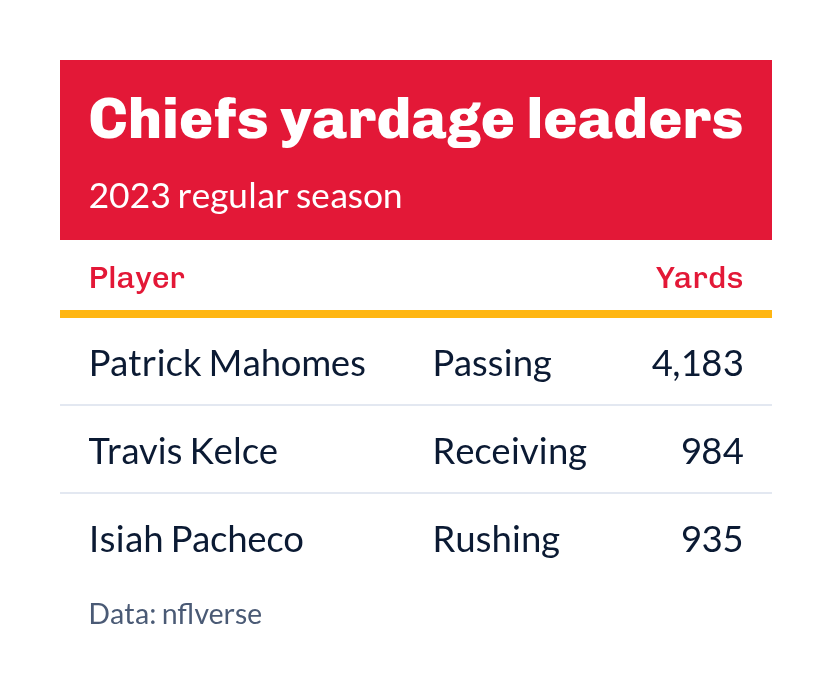
gt_theme_sdv() dressed in one team's colors: the title block is filled
with the team's primary color, the horizon line under the column labels takes
the secondary color, and the column labels are set in the primary color. The
colors come from sdv_team_colors(), so any abbreviation, alias or name
clean_team_abbrs() resolves works here.
Arguments
- gt_object
A
gttable object to modify.- team
Character. One team, as an abbreviation, alias or name for
sport. Defaults toNULL, which uses the SportsDataverse colors.- sport
Character. The league
teambelongs to; seesupported_sports(). Defaults to"nfl".- density
Character. The type and padding scale. One of
"comfortable","compact", or"social". See Density. Defaults to"comfortable".- ...
Additional arguments passed to
gt::tab_options, applied last so they override anything the theme sets.
Details
Text on the filled title block is black or white, whichever contrasts more
with the team's primary color, and the subtitle is blended toward it until it
still clears a 4.5:1 contrast ratio. When the secondary color would vanish
against the white table (a white or pale secondary), the horizon line uses the
primary color instead, and column labels fall back to the SportsDataverse
navy when the primary color is too light to read on white. With
team = NULL the table wears the SportsDataverse navy and cyan.
Density
density scales the theme's type and row padding together. "comfortable"
leaves every size as the theme sets it, "compact" scales both down, and
"social" scales both up, to the scale gt_save_crop() and
gt_social_crop() export at.
Examples
library(gt)
leaders <- data.frame(
player = c("Patrick Mahomes", "Travis Kelce", "Isiah Pacheco"),
yards = c(4183, 984, 935)
)
gt(leaders) |>
tab_header("Chiefs yardage leaders", "2023 regular season") |>
gt_theme_sdv_team(team = "KC", sport = "nfl")
Chiefs yardage leaders
2023 regular season